A few things you might be wondering
Reminders that fit the dose
Choose up to four reminder levels per medication, from a quiet card to a persistent dose alarm on supported devices.
Local and private by default
No visible account sign-up, no ads, and no behavioural tracking. Caregiver sharing is optional; proof-photo packages are end-to-end encrypted.
Pay once, own it forever
$9.99 CAD, one time. Every feature included. No subscription, no premium tier, no ads.
If any of this sounds like you, DoseAlert is going to help
DoseAlert was built for real people quietly caring for someone they love, or keeping their own complex prescriptions on track. Not a dashboard for clinicians. Not another subscription.
Know Mom took her pills — from 3,000 km away
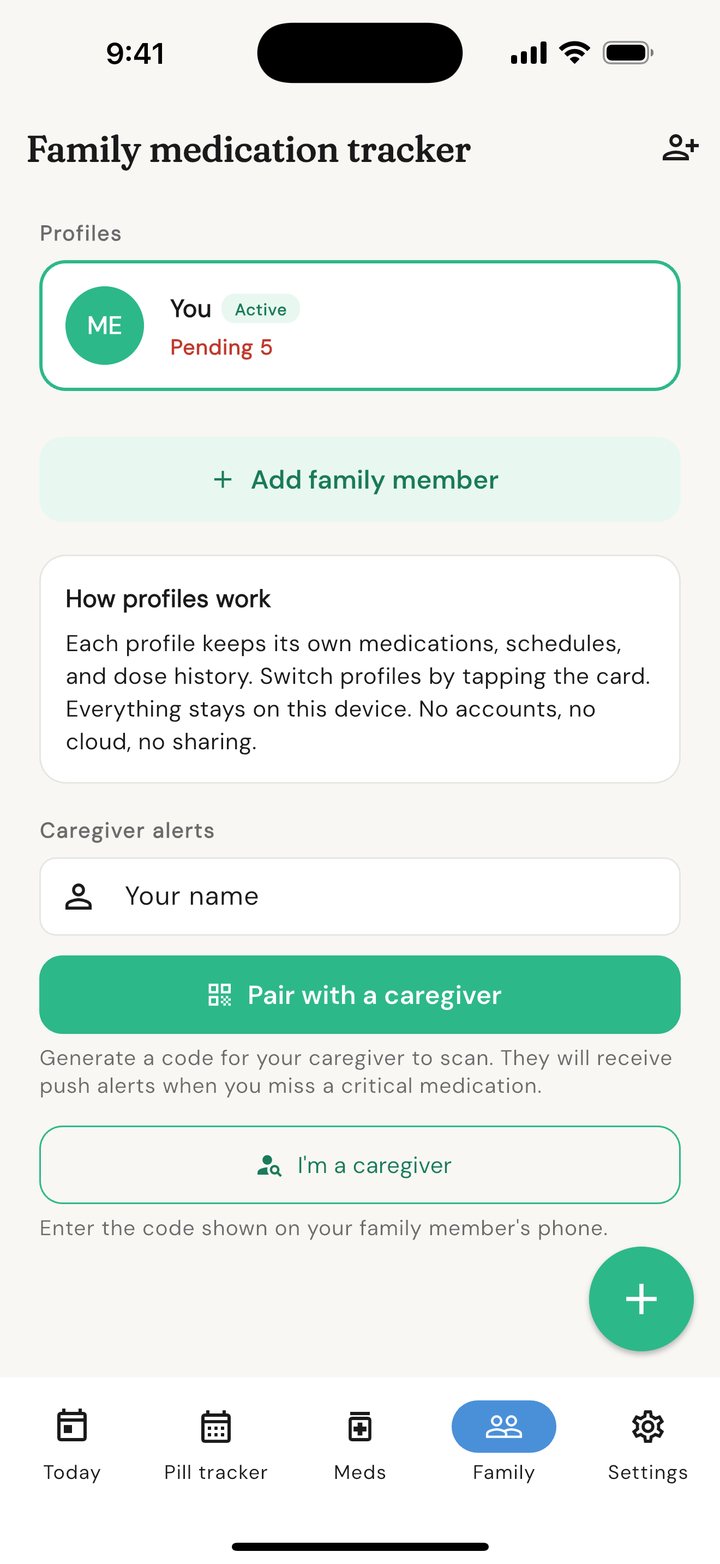
Pair your phone with hers to see shared dose status. When her app is running and online, it can send an alert after a dose becomes overdue.
A new prescription list shouldn't take over your day
Set up his medications once. DoseAlert handles the when, what, and how much. You go back to being his partner, not his pharmacist.
Peace of mind across generations
Grandma lives alone and forgets sometimes. You can't move in, but shared dose status can give you a clearer signal when it is time to check in.
Give important doses a stronger alarm
Critical-priority medications use the strongest reminder path the phone allows. iOS 26 uses AlarmKit; Android can use a looping dose alarm. Permissions and device settings still matter.
Prednisone tapers, birth-control cycles, PRN cooldowns
If your doctor prescribed it, DoseAlert can schedule it. Fixed times, every-X-hours, day-of-week, on/off cycles, step-down tapers, as-needed with cooldown — all built in.
Six pills at 8 AM becomes one tap
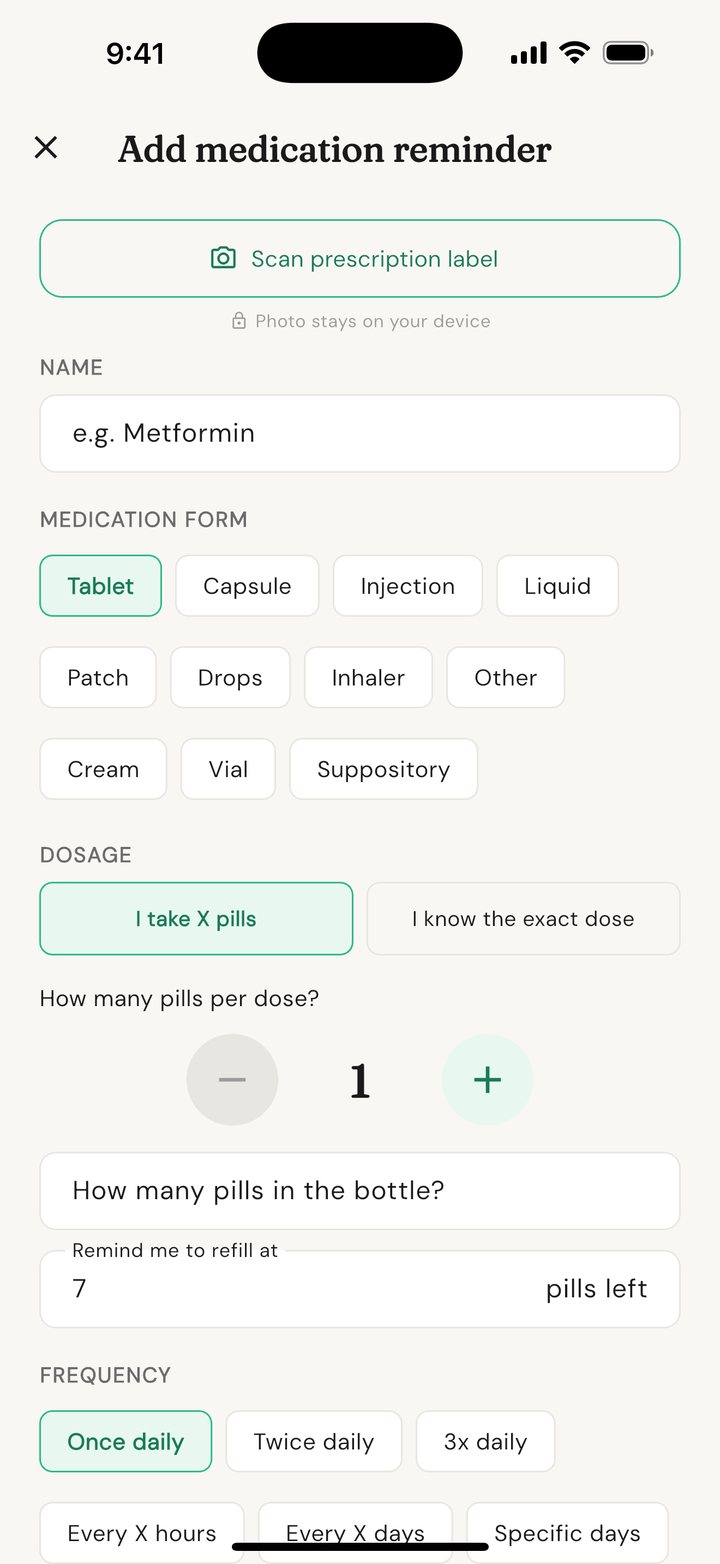
Group the medications you take at the same time. One reminder, one "All taken" tap. Each one logs at its correct dose and adjusts your refill count automatically.
A minute to learn. A lifetime of peace of mind.
A quick look at DoseAlert — the reminders, the tracker, the scanner, the family view. No sign-up. No account. No subscription.
Swipe through the app's main screens
Big tappable buttons, clear typography, and no busywork. Designed to be glanceable. Works with VoiceOver, TalkBack, and larger text on both iPhone and Android.
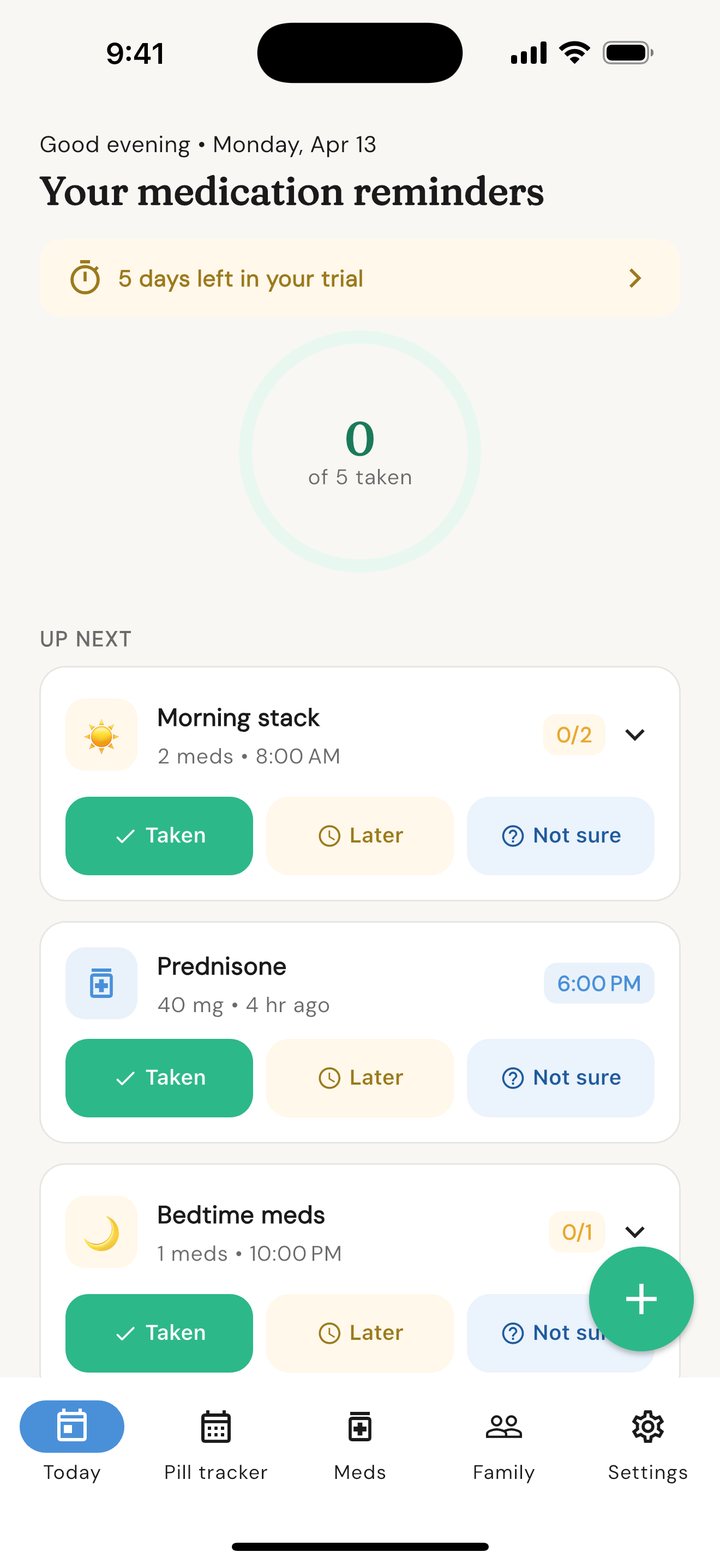
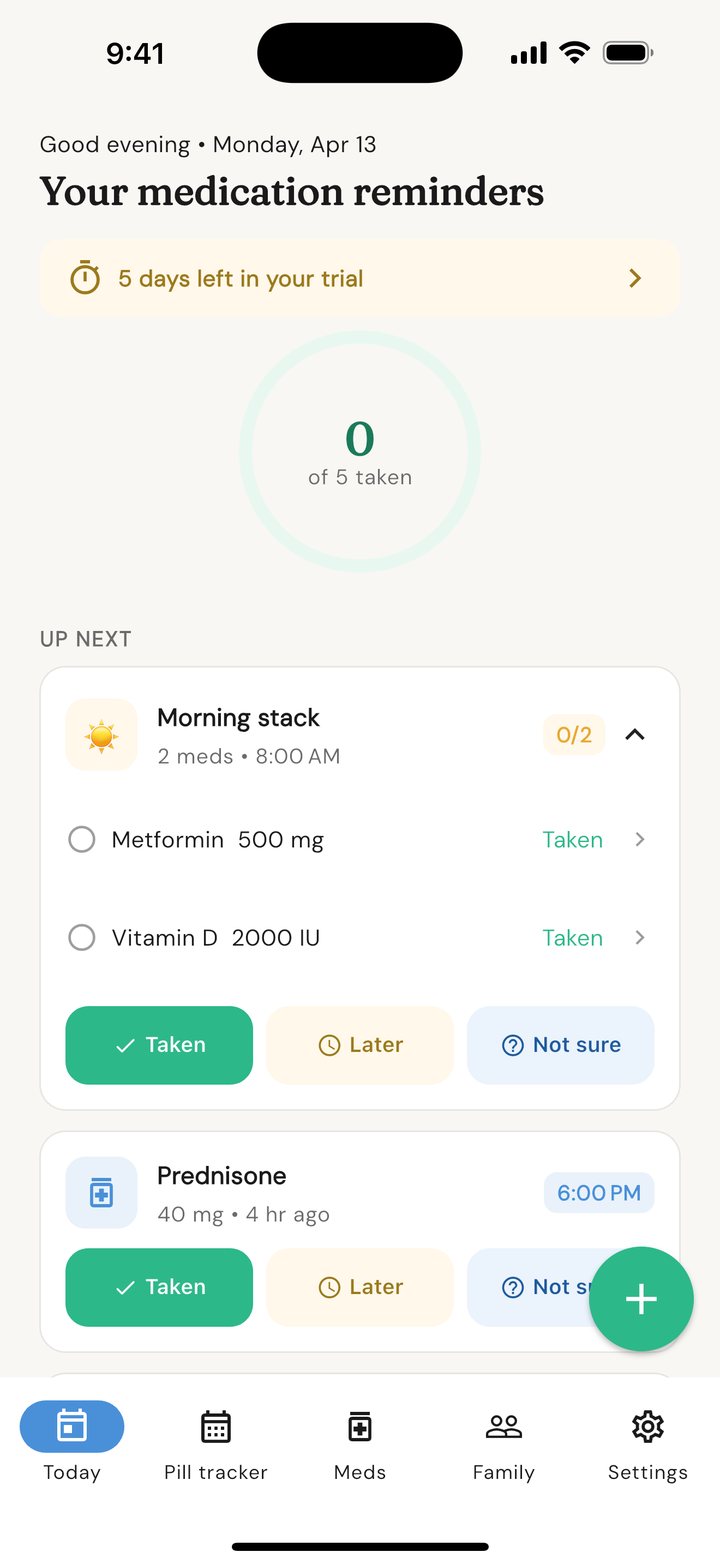
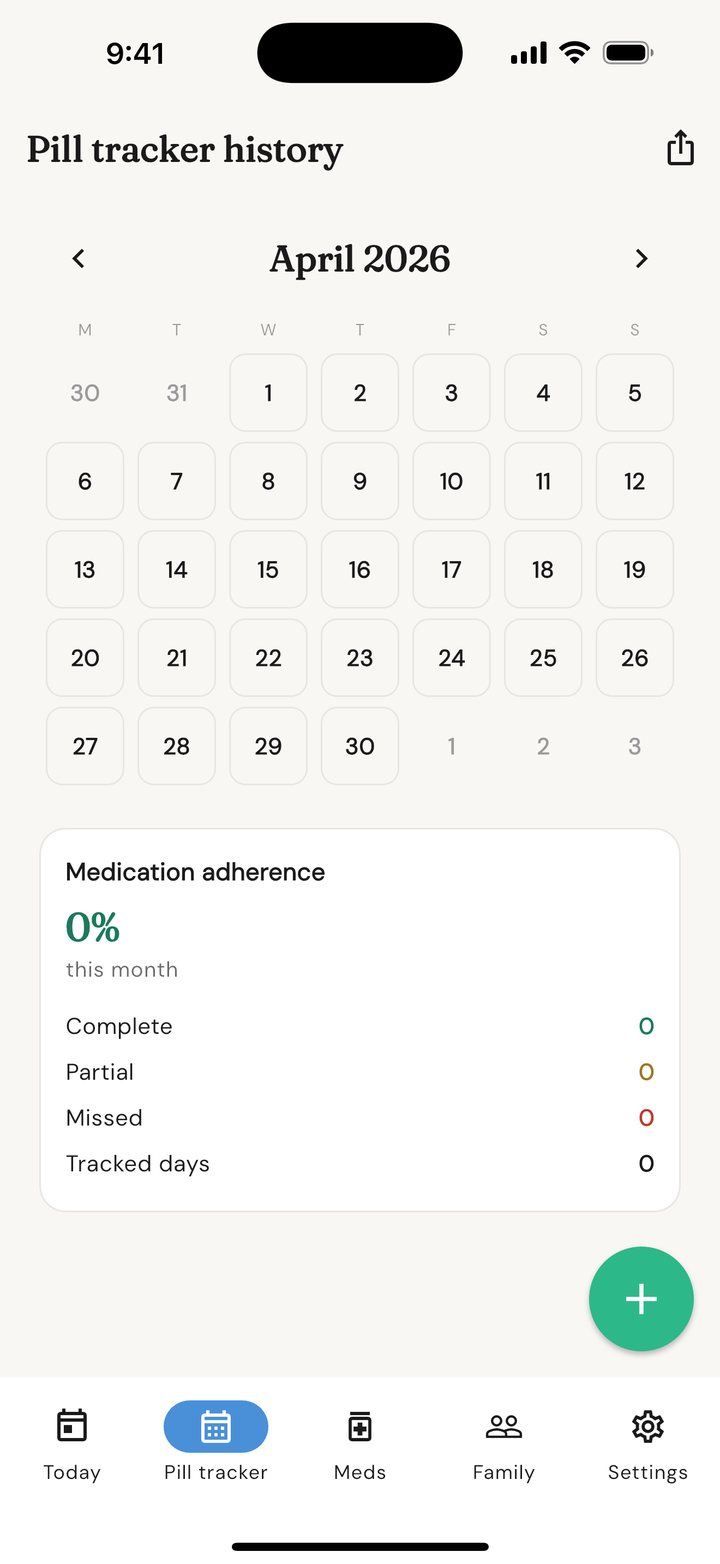
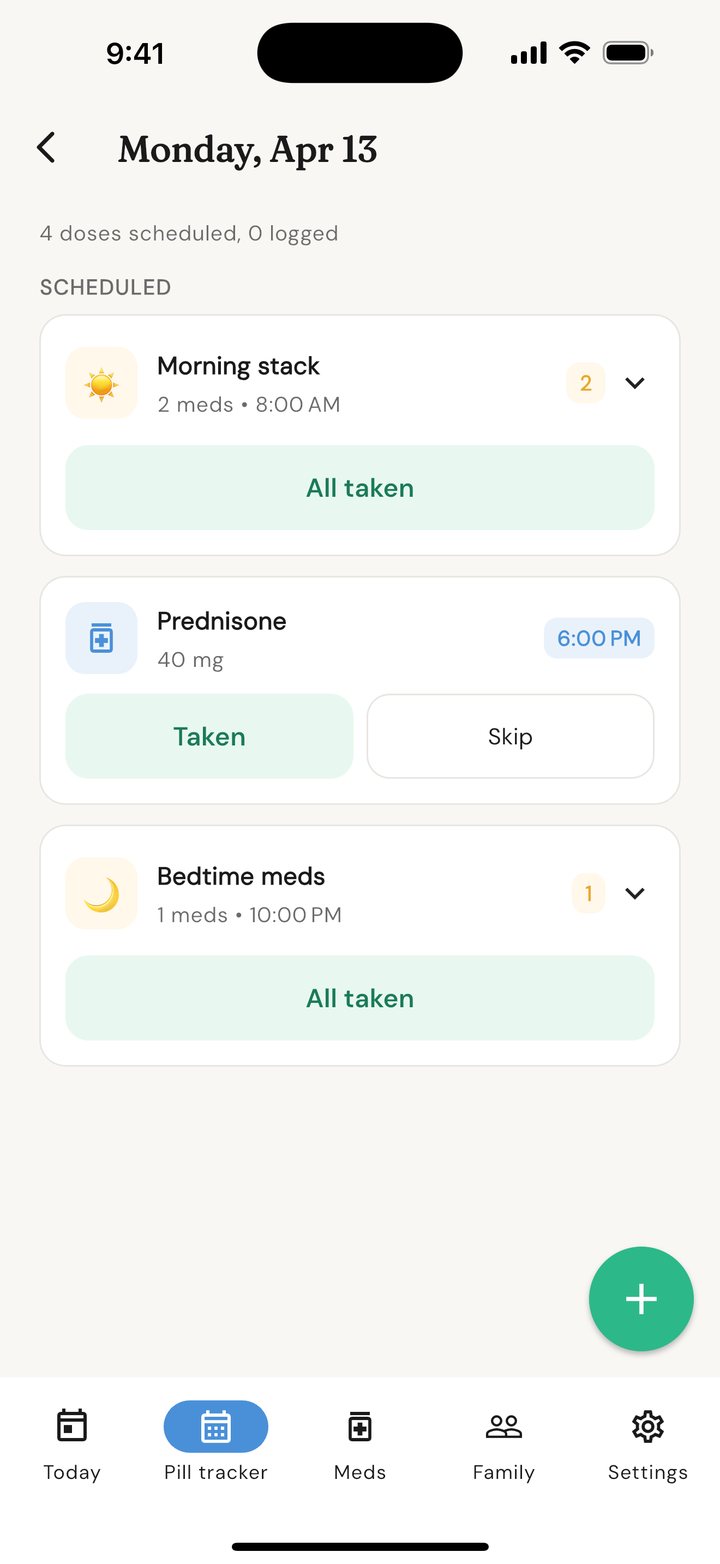
← Swipe to see more →
From download to first reminder in under 60 seconds
No account. No email. No tutorial. Install the app, add your first medication, and you're set.
Add your medication
Type it out or scan your pharmacy label. DoseAlert reads the name, dosage, and frequency automatically.
Pick a schedule
Daily, every few hours, specific days, on/off cycles, step-down tapers, or as-needed. Whatever your prescription says, DoseAlert can schedule it.
Get reminded, reliably
Up to four reminder levels per dose, from quiet to a dose alarm. Respond with Taken, Later, or Skip from the reminder or its dose screen.
Track your progress
A colour-coded calendar shows your adherence at a glance. Export a PDF report for your doctor in two taps.
What DoseAlert actually does for you
Every feature listed here is included in the one-time purchase. No tier system, no locked basics, no add-ons. We built the whole thing to do one job: help you look after the people you love.
If the first gentle reminder is missed, a louder one can follow
Configure up to four reminder levels per medication. Critical doses use AlarmKit on iOS 26 and a looping alarm service on Android when the required permissions are enabled. How reminders work →
Follow shared dose status on a caregiver's phone
Pair two phones by QR code or manual code. Dose updates and overdue-dose alerts use Firebase and need internet; the missed-dose check runs when the patient's app opens or resumes. Family and caregiver alerts →
Build a medication schedule around the actual instructions
Fixed times, fixed or floating intervals, specific days, cycles, tapers, temporary courses, per-time doses, active windows, dependencies, and as-needed cooldowns. All schedule types →
Six pills at 8 AM becomes one reminder and one tap
Group medications into a digital pill organizer. One combined reminder fires, one "All taken" button logs the due doses, and refill counts adjust for every pill. How groups work →
Point your camera at the pharmacy bottle. Done
Scan the prescription label and DoseAlert fills in the name, the dose, and the schedule for you. No typing. The photo is processed on your phone and discarded on the spot. Prescription scanning →
See the next dose on the iPhone lock screen
On supported iPhones, a Live Activity can appear on the Lock Screen, in StandBy, and in the Dynamic Island. It follows the exact scheduled occurrence and ends when that dose is resolved. How reminders work →
A calendar your doctor will actually ask to see
Colour-coded month view of every dose taken, skipped, or missed. Export a PDF for your next appointment or a CSV for your records — in two taps. Pill tracker and reports →
It'll warn you before you run out
Tell DoseAlert how many pills are in the bottle. It counts down every dose and reminds you when it's time to refill — before the empty bottle morning. Inventory and refills →
Require one proof photo for a dose or pill organizer
The clear photo stays on the patient's device. When caregiver sharing is enabled, DoseAlert automatically queues an end-to-end encrypted package for the paired caregiver and retries after an offline period.
Catch common conflicts before saving a medication
Search the bundled medication list, see local interaction warnings for recognised combinations, and review schedule suggestions based on your own dose history. These aids do not replace a pharmacist or prescriber.
And a dozen small things that matter
- Tapped Taken by accident? Undo it and the pill goes back in the count
- Different doses at different times — "two in the morning, one at bedtime" handled
- Floating intervals recalculate the next reminder from the actual taken time
- Link one medication to another with a take-after delay
- Scroll past today to see tomorrow and the rest of the week
- Quiet hours silence overnight reminders, with an optional critical-dose exemption
- Face ID or Touch ID keeps the medication list private
- Hide medication names on glanceable iPhone system surfaces
- Works with VoiceOver, TalkBack, and large text from day one
- Reliability guide for Samsung, Huawei, Xiaomi, and the rest
- Reminders survive a phone restart, so an overnight reboot never costs you a dose
- Travelling? Interval reminders adjust when your phone changes time zone
- Review reminder delivery history and export PDF, CSV, or a readable JSON backup
Some of the most common reasons people download the app
Every situation below is exactly what DoseAlert was built to handle. If one of them sounds like yours — the answer is yes.
A parent lives alone and sometimes forgets their heart medication
Mark the heart pills as critical priority and test the strongest alarm path available on that phone. If the dose becomes overdue, the patient's app can send a caregiver alert when it is running and online. It is a useful check-in signal, not a substitute for emergency monitoring.
A partner takes 14 different pills across the day and you're exhausted keeping track
Yes. Group the morning stack, the noon set, and the bedtime set into three reminders — not fourteen. One tap logs every pill at once. Different doses at different times are handled on a single medication, and refills tick down automatically so you know when to call the pharmacy.
A parent is resistant to "another app on their phone"
You can manage a separate local profile on your own phone. If they need reminders on their phone and you want shared status, install DoseAlert there too and pair the two devices.
A doctor just prescribed a prednisone taper and the instructions are confusing
Yes. Add the medication, pick "Taper," and enter each step the doctor wrote: 40 mg for 5 days, then 30 mg for 3 days, and so on. The reminders automatically adjust the dose every step without you having to remember where you are in the schedule.
You worry about privacy — this is medication information, after all
DoseAlert has no visible account sign-up, no ads, and no behavioural tracking. Medication records are local by default. Optional caregiver features relay selected alert details and dose status through Firebase; proof-photo packages are end-to-end encrypted. Unpair before uninstalling to deactivate the cloud connection.
New to this? Read our guide on how to choose a medication reminder app for an elderly parent.
Use it as long as you need. Pay when you're ready.
DoseAlert is free to try for 7 days with every feature unlocked. When you decide it's the right tool, a one-time purchase keeps it forever. Not a subscription. Not a trial trap.
- Unlimited medications, groups, and family profiles
- Every reminder style, quiet through loud alarm
- Every schedule type, including tapers and cycles
- Prescription label scanning
- Caregiver pairing, shared status, and online overdue-dose alerts
- Pill count and refill reminders
- PDF and CSV reports for your doctor
- App lock with Face ID, Touch ID, or passcode
- Portable JSON backup export
- All current features, with no paid tiers or add-ons
Nothing charges until you tap Unlock inside the app. Stay on the trial as long as you need to decide.
Your medications. Your phone. Your business.
A medication list is the kind of information we think should never be someone else's asset. DoseAlert keeps it on your device by default, and anything you share is your choice.
Questions we hear a lot
Quick answers to the most common questions. For more, head over to the help centre.
Is DoseAlert a subscription?
No. DoseAlert is a one-time $9.99 CAD purchase. You pay once and keep every feature forever. There is no monthly or annual subscription, no tier system, and no paywall hiding basic features.
Do I need to create an account?
No. DoseAlert works without an account, email, or sign-up. Install the app, add your medications, and you're set.
How does the free trial work?
When you first install, you get 7 days of full access to every feature, with no credit card required. After 7 days, a one-time $9.99 purchase unlocks the app for life. Your data is kept during and after the trial.
My reminders on Android stopped working. Why?
Nine times out of ten, it's your phone's battery-saving settings killing apps in the background. DoseAlert includes a built-in reliability guide with specific fixes for Samsung, Xiaomi, Huawei, OnePlus, Oppo, and Vivo. See the full guide.
Can I track medications for my mom or dad?
Yes. DoseAlert supports multiple profiles on one phone — each with its own medications, reminders, and history. You can also pair your phone with theirs so you get an alert if they miss a dose. Learn about family profiles.
Does DoseAlert work without internet?
Core features work offline: medication schedules, local reminders, dose logging, prescription scanning, and exports. Internet is required for purchases, caregiver pairing and ongoing caregiver delivery, cloud-started Live Activities, external help links, and crash diagnostics. Proof photos and dose logs save locally first and can be sent when the connection returns.
Is my medication data private?
Yes. DoseAlert has no visible account sign-up and does not collect analytics of your medications. Caregiver pairing is optional and can share alert details and paired dose tracker status through Firebase. Prescription scanner photos are processed entirely on your device and discarded immediately after. See the privacy overview.
Can I use DoseAlert on my tablet?
Yes. DoseAlert runs on iPad and Android tablets. The interface scales to the larger screen.
What if I already bought DoseAlert and switch phones?
Open the app on your new phone, go to Settings > Restore purchases, and sign in with the same Apple ID or Google Play account you used originally. The app unlocks at no cost. Full instructions.
How do I get a refund?
Refunds are handled by Apple or Google, not by DoseAlert directly. Apple: reportaproblem.apple.com. Google: Play Store > Account > Purchase history > DoseAlert > Request a refund.
Built by a small team in Fort St. John, BC
DoseAlert is made by Moose Media, an independent software company on the northern edge of British Columbia. We built this because the existing medication apps we tried either failed the basic job of reminding us reliably, or kept asking for a monthly fee to unlock the basics. No investors. No subscription traps. Just a tool we wanted to exist.
Questions, feedback, a feature request, or a hard day — we read every email. support@dosealert.app